
How should we account for expenditure where the cost is covered by or shared with another organisation?
This article covers how to account for expenditure where the cost is covered by or shared with another organisation.
In this article:
Situations in which cost-sharing could apply
On occasion, your charity or church may be responsible for administering the payment of shared expenditure with another external organisation. For example, you may be running a joint event and sharing the costs. Or you may share an employee with another organisation, paying the employment costs together.
In these situations, the required payments (whatever the purchase type) are likely to be paid by one organisation, with the other organisation contributing to or reimbursing their share of the costs.
As your organisation is purely administering the payment on behalf of both parties, you may choose not to account for their contribution as income to your organisation
Equally, you may not want to show their proportion of the costs as your expenditure.
If the other organisation is administering the payments to which you are then contributing, you should simply process expenditure as a supplier invoice in the usual way.
When your organisation is administering the payment
Assuming it's your organisation that is administering the payment (which you are then being reimbursed or part reimbursed for), then you need to follow these steps:
1. Process the outgoing payment
Process the outgoing payment (through the usual ExpensePlus process flow.
Then reconcile the expenditure as usual - as if your organisation was covering the whole cost.
2. Record the reimbursements
When you receive money from the other organisation (s) to contribute to their share of the costs, don't record the paid-in bank transaction as income.
Instead, you should select the Supplier Refund option. This will create a negative expenditure against the expenditure category.
To do this, once the transactions are uploaded or have been imported, on the Match Transactions screen:
- click on this incoming amount on the left-hand table
- in the popup select the Supplier Refund option.
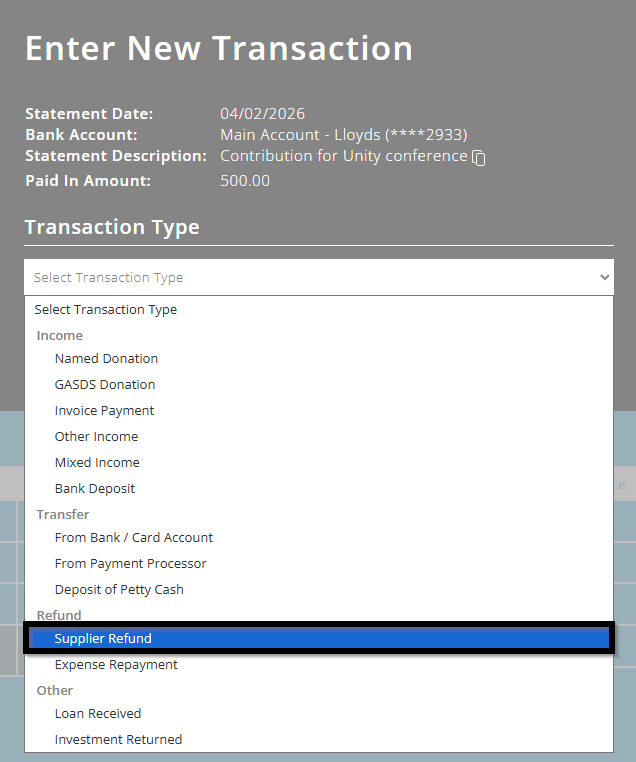
This will reduce the expenditure in that category and account for the money you have received, without recording it as income.
Do consult your Independent Examiner or Auditor for more advice, if you are unsure.
To better understand the Bank Reconciliation module, please view the module overview video here.