
Which reports should I use for my management accounts?
This article highlights some reports within ExpensePlus that you could use for your management accounts, to keep stakeholders informed on different aspects of your church or charity's finances.
In this article:
Income & Expenditure (by Fund)
Income & Expenditure Summary (by Category Connector)
What are management accounts?
Management accounts are financial reports produced for your organisation, generally on a monthly or quarterly basis. These reports can be used to update and inform key stakeholders, and to analyse how your organisation's finances are performing.
The reports each church or charity creates for this purpose can and will be different, depending on the needs and wants of those involved. These reports are customisable and drillable, allowing users with the right permission to view them in depth.
When creating Year-End accounts, specific information is required. This is not the case with management accounts, and within ExpensePlus, there are many financial reports that have information that you may wish to include in your management reports.
ExpensePlus has an excellent blog page, that includes a post titled Understanding Key Charity Financial Reports. We also run multiple training sessions on the finance reports within ExpensePlus. You can sign up for upcoming sessions and watch previous recordings on our Training Page.
Fund Movement Summary
The Fund Movement Summary provides a summary breakdown of income, expenditure and fund balances. Whether you create accounts on a receipts and payments basis, or on an accruals basis, this report provides a really helpful overview all funds.

When creating accounts on an accruals basis, fund balances shown within the fund movement report are made up of more than just 'cash'. The balance sheet report provides a breakdown of the assets and liabilities that make up fund balances.
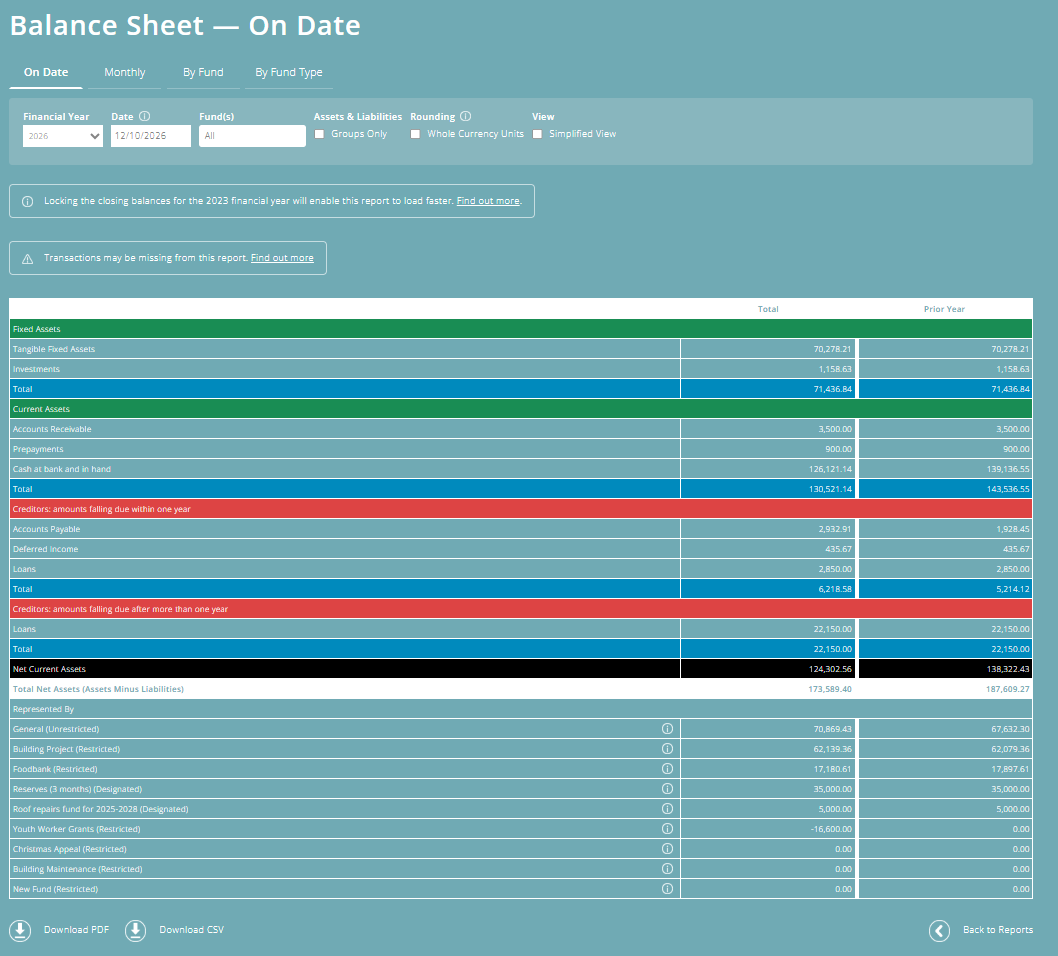
Balance Sheet
The Balance Sheet provides a breakdown of assets and liabilities for organisations that account on an accruals basis.
This report isn't relevant for charities that create accounts on a receipts and payments basis (cash basis).
There are 4 versions of this report to choose from (On Date, Monthly, By Fund, By Fund Type), and for each, you can either view particular funds or all funds.
For example:
- If you wish to see a breakdown of assets and liabilities which separates out restricted funds from unrestricted funds, you may wish to view the 'by fund type' version of the balance sheet report.
- If you wish to track how your General fund cash balance is changing month on month, you may wish to view the 'monthly' view of the balance sheet for your General Fund.
To learn more about the Balance Sheet and how to use it, please see our article What is the Balance Sheet report?
Income & Expenditure (by Fund)
Where you need a more detailed breakdown of income and expenditure than is shown on the Fund Movement summary report, the Income & Expenditure (by Fund) report will provide this.
Typically, this may only be needed for particular funds e.g. General fund.
For a less detailed breakdown of this report, select the 'category groups only' filter at the top of this report to view a summarised version of this report by category group.

Income & Expenditure Summary (by Category Connector)
The Income & Expenditure (by Category Connector) is a really useful report for viewing income and expenditure across all funds.
There are 5 versions of this report to choose from (monthly, quarterly, totals only, by fund, by fund type), and for each, you can either view particular funds or all funds.
For example:
- If you wish to view a breakdown of income and expenditure for each fund separately, then the 'By Fund' version of this report will provide this.
- If you would like to view income and expenditure for the whole charity by month, then you may wish to choose the 'Monthly' version of this report.
To learn how to set up Category Connectors, check out our article How to set up Category Connectors.

Monthly Comparison Donation Report
Along with including finance reports within your management reports, you may also choose to include a donation report with your management accounts. If so, the Monthly Comparisons Donation Report may be a great option to consider.
This report provides a summary by month of donors by donation amount, making it easy to spot trends and view how donors are responding to any donor appeals, campaigns and initiatives.
You can customise how donation amounts are broken down within this report using the 'Customise' option in the top right. You can also filter this report by fund, donation method or use the donor tag feature to further filter this report.

Downloading reports
Reports are self-service, enabling those with relevant permissions to remain up-to-date with current, real-time figures.
However, if you want to download and distribute a report by email or print hard copies, you can download via the PDF or CSV buttons at the bottom of the screen. When producing a PDF report, our system determines layout and page breaks. This is not user-customisable. Please choose the CSV option if you wish to customise the layout of the downloadable report yourself.


To better understand the Finance Reports module, please view the module overview video here, or book onto our free lunch and learn session which explores key financial reports in more detail.