
What if I want to cancel my ExpensePlus subscription?
This article explains how to cancel your ExpensePlus subscription.
It also explains what will happen to your ExpensePlus account and data after you cancel, and what you’ll need to do to ensure you have a copy of any reports or data you want to keep.
Unlike other software providers:
- You are not locked into a contract; you can cancel at any time, and there is no cost to cancel.
- We don't charge for exporting receipts (or make you download them one by one).
In this article:
When can I cancel my organisation's subscription?
You can cancel your account at any time without giving us notice, and there are no fees for cancelling.
You don't have to justify why you wish to cancel (though we value any feedback you are able to give).
If you subscribed by Direct Debit, please contact us no less than 7 days before your next subscription payment is due, so we can cancel your subscription with sufficient time to prevent further payments being taken.
Is there anything I need to do before I cancel the subscription?
Yes! Before you cancel your subscription, you will need to download all the data you need.
We'd recommend that this should include the:
- Trial Balance Report
- All Transactions (by Match) Report
- All Transactions (by Account) Report
By downloading these reports for each financial year, along with your receipts, you should have the financial records that you need to retain.
When you cancel, we can send you a copy of all the receipts and supplier invoices that you uploaded to ExpensePlus. You can request this within the cancellation form.
You may also wish to download other financial reports that you want to keep, such as:
- Income & Expenditure Report
- Balance Sheet Report
- Fund Movement Reports
You’ll find all of these in Financial Reports. If you are unsure which reports to download, you should check with your Independent Examiner or Auditor.
How do I cancel the subscription?
To cancel your ExpensePlus subscription:
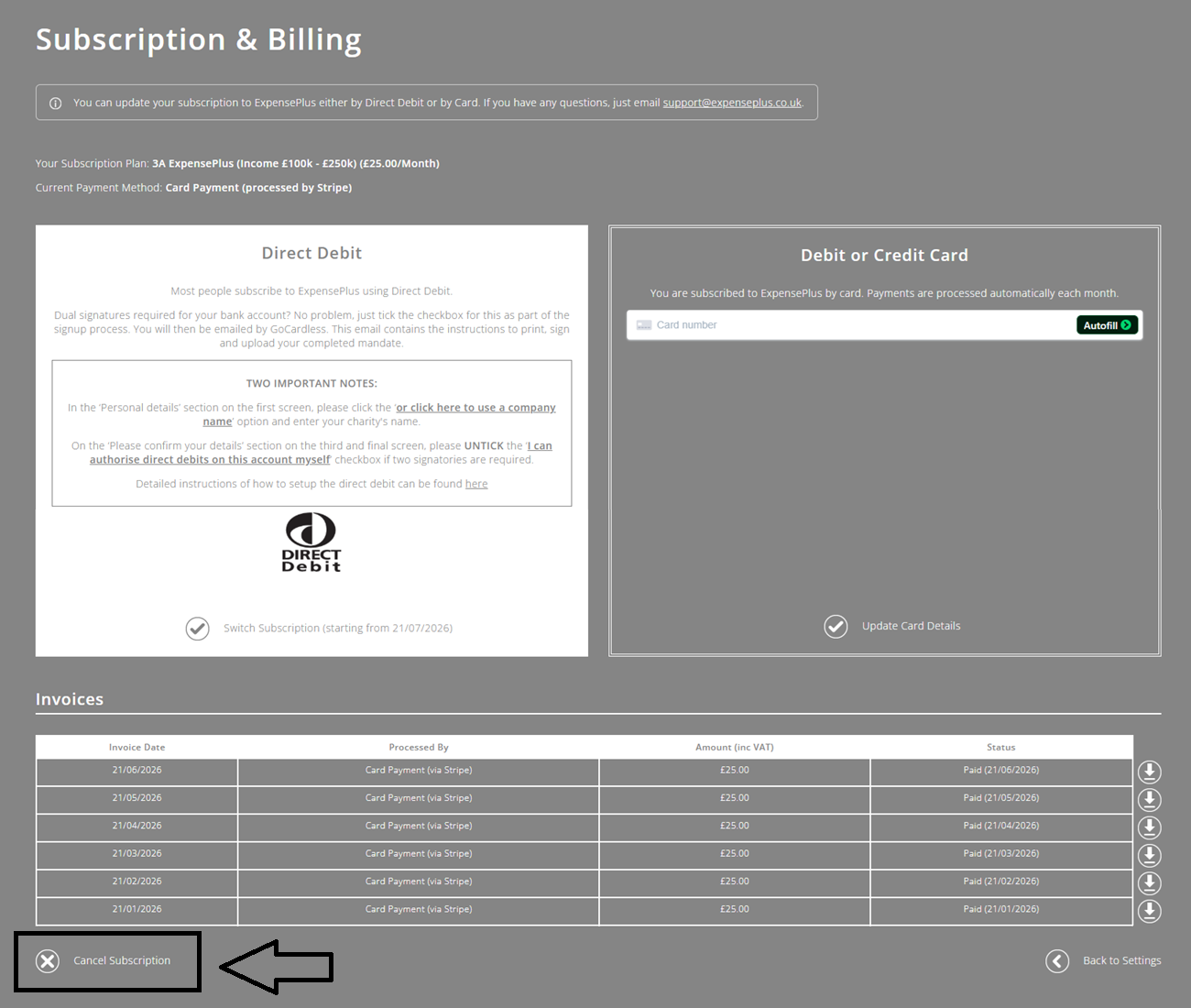
- Go to the Subscription & Billing screen
- At the bottom left of the screen, click 'Cancel Subscription'
- Fill in the simple Cancel Subscription form.
The Cancel Subscription form will ask you to confirm:
- that you have downloaded all the data you need
- that you’ve understood that both yourself and all other users of the organisation will no longer have access to your organisation’s data after you cancel
- that you’ve understood that 30 days after you cancel, all your organisation’s data will be fully deleted, without any option to restore it, including from backup
- that you are authorised to close down the account on behalf of your organisation.
Once you've submitted the form, we will deactivate your account and cancel your subscription with immediate effect.
We only accept cancellation requests via the form (not via email).
You will need to have the user role of Finance Team to cancel your organisation's subscription.
What happens to my organisation's access and data after I cancel?
Two things happen when we process your cancellation request (which is typically within 2 hours of you submitting the Cancellation Request form):
- Access to your organisation's ExpensePlus account is revoked for all users.
- 30 days after you cancel, your organisation’s data is fully and irrevocably deleted, including all backups that we hold.
Therefore, it's really important that before you cancel, you've downloaded all the data you need, and that you tick the box as part of the Cancellation Request form to request a copy of all receipts, if these are needed.