What to do if I have a negative Gift Aid claim
This article covers what to do if you have a negative Gift Aid claim showing on the Gift Aid screen.
Why you might have a negative claim
You may have a negative claim because you have over-claimed on a particular fund, but don't have enough donations for that fund in the same tax year to bring the claim back into a positive. As you can't submit a negative claim to HMRC, you will need to follow the steps below.
How to deal with a negative claim
If you have a claim that is currently negative (i.e. because you have refunded donations) and the claim amount is not likely to become positive soon, first, go to the Gift Aid screen and make a note of the negative amount and the fund to which it relates.
If the claim amount is likely to become positive soon, you can follow the guidance in our Help Guide article How do I make a Gift Aid adjustment?
Click into the claim as if you are going to claim it.

Once in the claim, click on the X button on the right-hand side of each donation refund to manually exclude each donation permanently from the claim. You can read more about this in our Help Guide article How to exclude a donation when creating a Gift Aid claim.
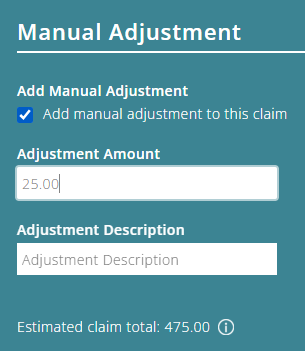
Next time you make a Gift Aid claim (any fund), add a 'manual adjustment' for the amount that has been previously overclaimed (this will reduce your current claim by the amount previously overclaimed). You can read more about this in our Help Guide article How do I make a Gift Aid adjustment?
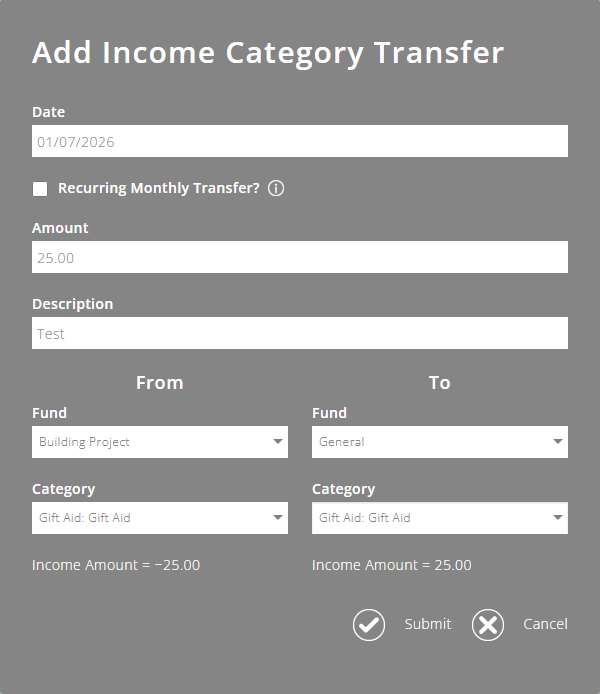
Then, complete an Income Category Transfer for the over-claimed amount, to move the Gift Aid income from the fund from which the Gift Aid was over-claimed (reducing the income in that fund), and into the fund you have used to make the claim (ie the claim that's been reduced by the manual adjustment). You can read more about this in our Help Guide article Income Category Transfers.
Adding the income category transfer will ensure that the Gift Aid is accounted for correctly. This will be important if one of the funds is a restricted fund.
Example
You have a Gift Aid claim to make for your General Fund that will be £500. You add a manual adjustment of £25 to make up for a £25 overclaim in your Building Project Fund, meaning your General Fund claim will be reduced to £475.
You want to ensure an income of £500 is shown in your General Fund. However, as only £475 will be paid into your bank, you will need to add an Income Category Transfer for £25 from the Gift Aid category in your Building Project Fund to the Gift Aid category in your General Fund.